Back
Proxy for WhatsApp in 2026: Stop Losing Accounts
WhatsApp is the most unforgiving major platform for multi-accounting: numbers get banned before you send your first message. Yet business across Africa, South Asia and Latin America runs on WhatsApp — sales, support, outreach. Here's how proxies solve the ban problem, which type fits which task, and which mistakes kill numbers in batches.
Why WhatsApp bans accounts
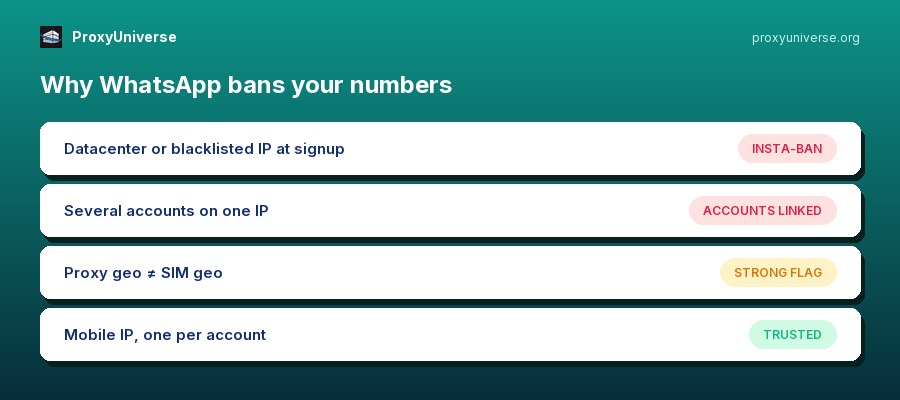
WhatsApp runs two layers of defense. The first fires at registration: the platform scores the reputation of the IP the number arrives from. A datacenter IP or a blacklisted address means the number dies minutes after activation — the classic insta-ban. The second layer is behavioral: several accounts on one IP, bulk messaging, sudden geo jumps. Each factor alone raises suspicion; two or three together mean a ban.
Why mobile proxies are the WhatsApp standard
WhatsApp is a mobile app, and the platform expects mobile traffic. Mobile proxies have a property nothing else has: one carrier IP is shared by thousands of real subscribers through CGNAT, so banning a mobile IP is too expensive — hundreds of legitimate users would drop with you. Hence the rule: registration and warm-up go through a mobile proxy only, matching the country of the number.
Which proxy for which task
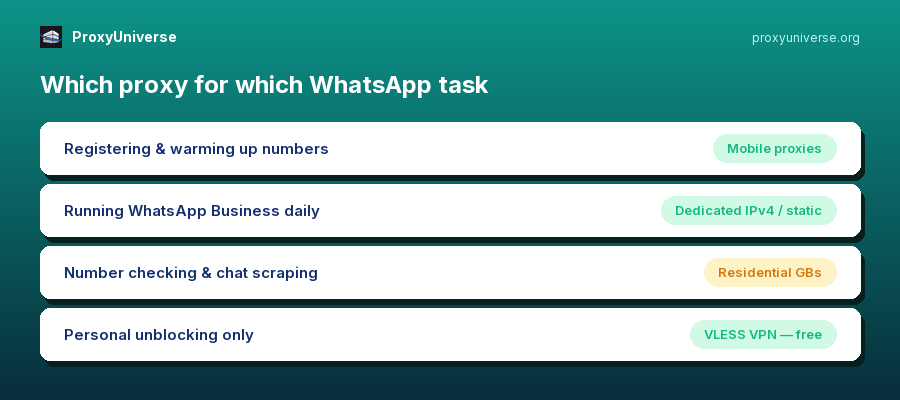
Registering and warming up numbers — mobile proxies. The most sensitive stage; saving money here means losing numbers.
Running warmed-up WhatsApp Business accounts — dedicated IPv4 or a static residential IP: one persistent address per account, so the platform sees a stable user.
Outreach and automation — a combo: accounts sit on their persistent IPs, while support tasks (number checking, chat scraping) run on rotating residential GBs.
Three rules that keep numbers alive
One account — one IP, forever. An account hopping between addresses looks hijacked. A fixed-IP proxy stays with the number for its whole life.
Proxy geo = number geo. A Nigerian number on a German IP is an instant flag. Match the proxy country to the SIM country.
No free lists, ever. Public proxies were burned by thousands of bots before you: their IPs sit in every platform's blacklists. A free proxy for WhatsApp is a paid ban.
Setup in 5 minutes
Emulators and antidetect browsers take SOCKS5/HTTP directly. On physical Android use apps like SocksDroid; on iOS — Shadowrocket. Get a proxy from the catalog (1-minute delivery), enter host-port-login-password, verify your IP on whoer.net — and only then launch WhatsApp. If the address doesn't fit, we replace it on request.
Bottom line
The WhatsApp survival formula: mobile proxy for registration → persistent IPv4/static for daily use → rotation for side tasks → geo matches the SIM → one IP per account. All three types are in the catalog with 1-minute delivery and replacement on request.
Questions and answers
What's the best proxy type for WhatsApp? A: For registration and warm-up — mobile proxies
WhatsApp trusts carrier IPs the most. For running warmed-up accounts — a dedicated IPv4 or static residential IP assigned to the account permanently.
Can I run several WhatsApp accounts on one IP?
No — accounts sharing an address get linked, and one ban drags down the rest. The rule is one account, one persistent IP.
Why can't I use free proxies for WhatsApp?
Public lists are burned by thousands of bots: their IPs are in the platform's blacklists. Registering through one is a near-guaranteed ban within minutes.
Which country should the proxy be from?
The same country as the SIM card. A geo mismatch between the number and the IP is one of the strongest anti-fraud signals WhatsApp has.